If you’re reading this, you’re probably staring at a spotty RF signal, dropped calls, or unreliable data that’s making your job — whether you’re a field tech, a network engineer, or a small business owner — way harder than it needs to be. More often than not, the culprit’s a wonky N connector: those chunky, durable RF connectors we make a living at, right? They’re built for high-frequency stuff (think cellular towers, test equipment, industrial IoT) so they can take a beating, but even the toughest parts mess up when you skip a step. I’ve fixed my share of frustrating connection issues over the years, and I’m gonna walk you through the troubleshooting steps we actually use on the shop floor, no fancy jargon, just straight-up stuff that works. N RF Connector
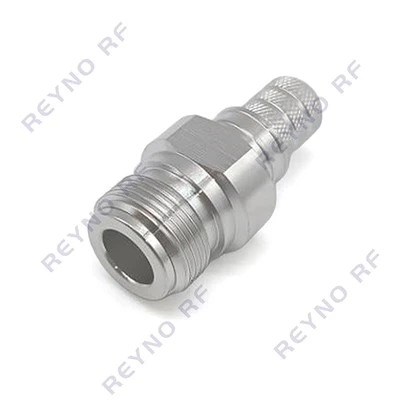
First off, let’s cut to the most common mistake that trips everyone up: bad installation. I see this all the time — someone slaps an N connector on a cable tight enough to strip the threading, or doesn’t crimp the center conductor right, and then blames the connector itself. Let’s start with the basics because 80% of connection problems are just bad install. When you prep a low-loss cable (like LMR-400 or LMR-600, which are the ones N connectors pair with), the dielectric’s outer jacket needs to be stripped clean — no crumbs, no extra plastic left — before you slide the ferrule on. If that dielectric gets nicked while stripping, it throws off the impedance, and your signal won’t pass through. Same with the center pin: you have to trim it so it’s just flush with the end of the dielectric, not too short (it won’t make contact with the device’s center pin) or too long (it’ll bend or touch the outer shield, causing a short). I’ve seen techs cut the center pin with a knife instead of a wire stripper, and the frayed bits cause endless intermittent issues. That’s a quick fix, right there: just re-prep the cable properly with the right tools, and you’ll probably fix half your problems without even touching the connector’s threading.
Next, let’s talk about the mating part — because N connectors are two-piece: the plug (on your cable) and the jack (on your device, whether that’s a router, a base station, or a test meter). A lot of people grab a wrench and crank that connector until their hand cramps, but over-tightening is just as bad as under-tightening. N connectors are ½”-20 thread, and the torque spec for most standard 50-ohm N connectors is between 15 and 20 in-lbs. If you don’t have a torque wrench, here’s a rough hack: turn it with your fingers until it’s finger-tight, then give it a quarter turn with a wrench. That’s it. I’ve had customers send back connectors that looked fine but had crushed the inner dielectric because someone cranked it down too hard — that bends the center pin and ruins the mating surface on both the plug and jack. On the flip side, if it’s too loose, even a tiny vibration (from a cell tower on a roof, or a server rack shaking) will make the connection drop mid-test. I once had a customer with a rooftop antenna whose signal kept cutting out every time the wind picked up; we tightened the N connector to spec, and that was the end of the problem.
Now, let’s get into dirt and corrosion — the silent killers of N connectors, especially if they’re outdoors. N connectors are weather-sealed if they’re the right type, but if the seal’s cracked or you skipped a weather boot, moisture and dust will get in, build up on the mating surfaces, and block the signal. I’ve pulled connectors from rural cell sites that had spider webs and mud on the inner contact — no wonder the signal was garbage. How do you check that? Disconnect the plug and jack, and take a look at the center pin of the plug and the inner contact of the jack. If there’s any grime, use a cotton swab dipped in isopropyl alcohol (90% or higher, no water-based stuff) to gently clean them. Avoid paper towels or rough cloth — they’ll leave lint that’s even worse. If the center pin looks tarnished or discolored, that’s corrosion; a light rub with a pencil eraser (the soft kind, not the kneaded one) will buff it back to shiny metal. Just don’t press too hard, you don’t want to bend the pin.
Another big one: bad connectors, not your install. We make N connectors to meet strict specs, but sometimes a batch slips through quality control — or someone buys a cheap knockoff from a no-name supplier, and that’s where the problems start. A fake N connector might have a misthreaded body, a center pin that’s too short, or a dielectric made from cheap plastic that melts at high frequencies. I had a customer last year who was using off-brand N connectors for his industrial IoT network, and half his sensors were dropping offline. We tested our connectors next to his, and his had an impedance mismatch of 10 ohms — way outside the 50-ohm spec required. The fix? Swapping to our proper N connectors fixed 90% of his issues immediately. So if you’ve tried re-installing, tightening, cleaning, and it’s still messed up, swap out the connector with a new one (from a reputable supplier, that’s us, by the way) and test again. That’s the quickest way to rule out a faulty part.
Wait, what about center pin alignment? Sometimes when you mate the plug and jack, the center pins don’t line up straight. If you’ve crimped the center pin crookedly on the cable, it’ll tilt when you connect it, and the two pins won’t make full contact. You can check this by holding the plug up to a light — if the center pin looks off-center, not dead in the middle of the outer shield, you’ll need to re-crimp the ferrule and center pin. I keep a cheap magnifying glass in my tool bag for this; it’s way easier to see tiny alignment issues when you’re not squinting. Also, some N connectors have a keyway — make sure you’re lining that up right, not forcing it sideways. Forcing a misaligned connector will bend the center pin permanently, and you’ll have to replace the whole plug.
Let’s not forget the outer shield. The shield on N connectors is supposed to create a continuous metal path between your cable and the device, blocking interference. If the braid on your cable isn’t folded over the ferrule when you crimp, or the outer shield is cut short, that’ll cause signal leakage. You can test this with a multimeter set to continuity: touch one probe to the cable’s outer braid, and the other to the connector’s outer nut. If there’s no beep, your shield is broken, and you need to re-prep the cable. This is extra important for high-frequency applications, like 5G or radar, where even a tiny leak kills performance. I once fixed a 5G router that had dropped signal entirely; turns out the tech had trimmed the braid too short when prepping the N plug, so the shield wasn’t connected. A quick re-crimp, and the signal was back to full strength.
What about intermittent issues, not just static? If your connection works sometimes and cuts out other times, it’s almost always a loose or bent center pin, or a tiny bit of debris stuck between the mating surfaces. I had a network engineer who called me panicking because his test lab’s signal would drop every 10 minutes. We ended up taking apart the connector and found a tiny piece of copper shavings from a previous cable prep stuck between the center pin and outer contact. A quick clean, and it didn’t come back. Another common intermittent issue: loose locking rings on threaded N connectors (wait, no, N connectors use threads, not locking rings — sorry, mix-up with SMA connectors). For N, it’s all about that thread tightness, and if the nut’s worn, it’ll strip over time, so you’ll need to replace the jack on the device if that’s the case.
Let’s walk through a step-by-step checklist to make this easy, no guesswork: 1. Prep Check: Strip cable jacket clean, trim center pin flush, fold braid over ferrule, crimp firmly (use a crimp tool rated for your cable size). 2. Tightness Check: Finger-tight, quarter turn with wrench — don’t overdo it. Test with a torque wrench if you have one. 3. Visual Check: Inspect mating surfaces (center pin, inner contact) for dirt, corrosion, or bent pins. Clean with isopropyl alcohol and a cotton swab. 4. Continuity Check: Use a multimeter to confirm the shield is connected, no short between center and outer. 5. Swap Test: Replace the N connector with a new one (from a trusted supplier) to rule out a faulty part.
If you’ve gone through all these steps and the connection’s still wonky, it might not be the connector at all — could be the cable is damaged (kinks or cuts in the shield), or the device jack is worn out. But 9 times out of 10, it’s one of these steps. We’ve helped hundreds of field techs and engineers troubleshoot their N connector issues, and the best part is, most fixes take 5 minutes.
At the end of the day, N connectors are built to be tough, but they’re not unbreakable. Skipping a prep step, over-tightening, or using cheap parts are the biggest mistakes we see. If you’re tired of chasing wonky connections and want to make sure your N connectors are right the first time, we can walk you through picking the right type for your application, prepping your cables correctly, and even troubleshooting on-site if you need it. No hoops, no sales pitch — just straight help for anyone dealing with N connector headaches. If you’re ready to stop troubleshooting and get a solid, reliable connection, reach out to discuss your needs. We’re here to make your job easier, not harder.
N RF Connector References
- RF Connector Basics: N-Type Connectors, Microwave Journal
- Installation Guidelines for Coaxial Connectors, Telecommunications Industry Association (TIA)
- Troubleshooting High-Frequency RF Connections, IEEE Microwave Magazine
- Performance Testing of N-Type Connectors, Anritsu Application Note
Zhenjiang Leiluo Electronic Co., Ltd.
Zhenjiang Leiluo Electronic Co., Ltd. is one of the most professional n rf connector manufacturers and suppliers in China. We have world-leading production equipment and strong manufacturing capabilities. Please feel free to buy advanced n rf connector for sale here and get quotation from our factory. Customized orders are welcome.
Address: No.21 Houxiang Industrial Road, Danbei Town, Danyang City, Jiangsu Province
E-mail: wenvy@rfleiluo.com
WebSite: https://www.rfreyno.com/
