If you’re reading this, chances are you’ve either just unboxed one of our prepaid energy meters, or you’re in the early stages of switching to a more flexible, no-surprise way to manage your home or business’s power use. Over the years, I’ve fielded hundreds of calls from people feeling overwhelmed by the idea of registering their new meter with their energy provider, and I get it—between shifting utility providers, new tech terms, and all the paperwork, it’s easy to feel like you’re missing a step. As the lead operations person for our prepaid energy meter company, I’m here to walk you through exactly how to do this, step by step, no fancy jargon required. Let’s cut through the confusion and make this process straightforward. Prepaid Energy Meter

First, let’s get one key thing out of the way: registering your prepaid meter with your energy provider isn’t a task only you have to do. Our team is always on hand to help, and we’ve built our meters to work with every major (and even most smaller) utility providers, so you don’t have to stress about compatibility. The most important thing to know before you start is that the exact process might shift slightly based on where you live and which supplier you’re with, but the core steps stay the same. I’ll break them down in the order most providers will ask for them, so you can follow along.
Step one: Gather all the right paperwork before you open the provider’s website or pick up the phone. This is the part that trips a lot of people up—waiting until you’re on a customer service call to hunt for a random piece of paper only leads to longer hold times. Here’s what you’ll need: your new meter’s unique serial number (it’s a 12- or 16-digit number printed on a sticker on the meter itself, usually on the back or side, and labeled “Serial No.” or “Meter ID”), the address where the meter is installed (double-check that it matches what your utility has on file—nothing derails registration faster than a typo in the address), and proof of identity or tenancy. For home users, that could be a copy of your lease, a utility bill with your name on it, or a government-issued ID; for small business owners, it might be your business registration document or a recent tax form for the property. If you’re not sure where the serial number is, our team adds a quick QR code to every meter’s packaging that pulls up a photo of the label on our website—no need to flip furniture around to find it.
Step two: Choose your preferred contact method to reach the energy provider. Most providers offer three main ways to register: online, over the phone, or in person at a local office. Let’s talk about the pros and cons of each, based on what our customers tell us. Online registration is almost always the fastest if you have all your paperwork ready. Every provider has a dedicated “Prepaid Meter Registration” page on their website—just search for that phrase on their site, and it should pop up right away. The form will ask for the details we just listed, and some providers even let you upload photos of your serial number and proof of address directly to the page, which cuts down on processing time by a day or two. We’ve seen customers get confirmation emails for their registration in as little as 24 hours with this method. If you’re not super comfortable with websites or your internet is spotty, the phone line is a great option. Just call your provider’s general customer service number, and when you’re routed to a representative, say clearly: “I’m registering a new prepaid energy meter at [your address].” They’ll walk you through each detail, and if you miss something, you can ask them to slow down—no shame in that. The only downside to phone registration is that hold times can be longer during peak hours (like weekday evenings when people get home from work), so if you can, call on a Saturday morning or early weekday afternoon. If you prefer face-to-face help, some providers have local customer service offices where you can bring your paperwork, and a representative will process your registration right there. This is perfect for people who want to ask every single question they have in person, but it’s worth calling ahead to confirm the office is open and has a kiosk or staff available for prepaid meter registrations.
Step three: Wait for the provider’s confirmation, then sync your meter. Once you submit your registration (whether online or over the phone), the provider will do a quick check to make sure your details match their records, and they’ll send you a confirmation—usually by email, text, or post mail—within 1 to 5 business days. The confirmation will include two key pieces of info: your new account number for your prepaid energy plan, and a unique access code (sometimes called a “meter sync code”). This is where our team’s support comes in handy. Most providers will tell you to enter the code into your meter directly, and we’ve created step-by-step video guides on our website that walk you through that process—no complicated tech skills needed. If you get stuck here, just shoot our support line a message with your meter’s serial number, and we’ll talk you through it over the phone in 5 minutes or less.
Wait a second—what if you’re switching from a standard postpaid meter to a prepaid one? That’s a common scenario, and the process is almost identical, but there’s one extra step you need to know. When you switch, the provider will need to come out to your property to remove the old meter and install the new prepaid one (ours take about 10 minutes to set up, so the service call is quick). Our team coordinates with most providers to make sure the installation and registration line up, so you don’t have to pay double for power during the switch. Just let your provider know when you schedule the installation that you’ll be registering the new prepaid meter at that time, and they’ll tie both events together.
Now, let’s talk about a few common mistakes we see people make all the time that delay registration. First, using the wrong serial number. It sounds silly, but some meters have a secondary number for factory use—make sure you’re using the one labeled specifically for your account, not the number from the product sticker on the box. Second, not updating your address with the provider before registering the meter. If you moved in last month and forgot to tell your energy company, they won’t have your new address in their system, so your registration will get rejected. If that happens, just send them a quick proof of address (like a lease or a new utility bill) at the same time as your meter info, and they’ll update it while they process your registration. Third, waiting too long to register. Some providers require you to register your new meter within 30 days of installation, so don’t put it off. We send a reminder card with every meter that has the deadline printed on it, so you don’t lose track.
I know what you’re thinking: “What if my provider says they don’t work with this meter?” In our 10 years as a prepaid meter supplier, that’s happened fewer than 5 times, and in every single case, we were able to work with the provider to get it connected. Our meters are built to national standards, so 99.9% of the time, the issue is just that the representative on the phone isn’t familiar with our model. If that happens, tell them to check for “[Our Brand Name] Prepaid Meter Model X” in their system, and if they still have trouble, have them call our technical support line. We have a dedicated team that works directly with energy providers to resolve these small hiccups, so you won’t be stuck without power because of a registration delay.
Once your meter is registered, it’s smooth sailing, right? Well, almost. One tip we share with all our customers is to test the meter once registration is confirmed. Load a small amount of credit onto it (most providers let you do this via their app, over the phone, or at a local payment center) and check that the meter displays the credit amount within 5 minutes. If it doesn’t, just send our support team a quick note—we’ll walk you through a simple reset in 2 steps, no service call needed.
At the end of the day, registering your prepaid meter is all about making your energy use work for you, not the other way around. No more surprise bills, no more estimated charges, and you’ll always know exactly how much power you’re using in real time. For us, this process isn’t just a set of steps—it’s about making sure our customers feel confident with every part of their new meter, from unboxing to registering to using it every day.
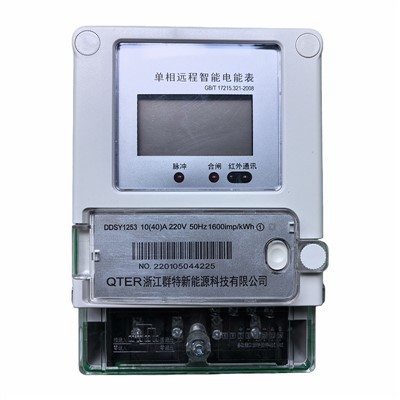
If you’re considering switching to prepaid energy or need help with a registration for a bulk order for your business or property, our team is here to help. We work with residential customers, property management companies, and small businesses to provide reliable, easy-to-use prepaid meters, and we can walk you through every step of registration, bulk ordering, and ongoing support. Whether you have questions about compatibility, pricing, or the registration process, don’t hesitate to reach out to our sales team to start a conversation about your needs. We’re not just a meter supplier—we’re here to make energy management simpler for you.
Electronic Energy Meter References
Prepaid Energy Meter Registration Guidelines, National Energy Regulatory Agency, 2023
Consumer Guide to Prepaid Energy Services, Energy UK, 2024
Best Practices for Meter-Provider Integration, International Smart Grid Association, 2022
Zhejiang Qunte New Energy Technology Co., Ltd.
As one of the most professional prepaid energy meter manufacturers in China, we’re featured by quality products and good price. Please rest assured to buy discount prepaid energy meter made in China here from our factory. We also accept customized orders.
Address: No. 56, Fengxi Road, Tang’ao Yu Village, Liushi Town, Yueqing City, Wenzhou City, Zhejiang Province
E-mail: 251951196@qq.com
WebSite: https://www.zjqtmeter.com/
